

Description
Streamline Meetings with AgreeDo
Overview
AgreeDo is a desktop application designed to enhance meeting effectiveness by streamlining agenda creation, minute-taking, and post-meeting follow-up. The software enables users to prepare meeting agendas in advance, collect input from participants, and generate structured minutes that capture key decisions, tasks, and unresolved issues. After meetings, users can track the progress of assigned tasks and monitor whether decisions are being implemented. This structured workflow helps teams maintain accountability and ensures that meeting outcomes translate into tangible results.
The tool is particularly useful for professionals and teams in corporate environments where regular meetings are part of daily operations. By encouraging proactive preparation and clear documentation, AgreeDo addresses common pain points such as unproductive meetings, missed follow-ups, and lack of transparency in task execution. It supports collaborative workflows by allowing team members to contribute to agendas and review meeting outcomes in real time.
Although the developer’s background is not specified, the software’s functionality suggests a focus on productivity and team collaboration. Real-world use cases include project management teams, departmental leadership, and remote work teams aiming to improve meeting quality and operational efficiency. The application is accessible via desktop platforms, supporting both Windows and Mac operating systems.
Key Features & Capabilities
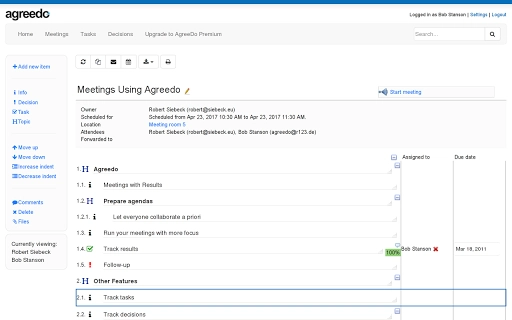
- Agenda Preparation – Users can create meeting agendas in advance and share them with attendees, who can add their own discussion points. This ensures that meetings are focused and participants come prepared.
- Automated Meeting Minutes – The software captures decisions, tasks, and key discussion points during meetings and compiles them into structured minutes for distribution.
- Task and Decision Tracking – After meetings, users can monitor the status of assigned tasks and verify whether decisions are being implemented.
- Follow-Up Meeting Templates – A built-in feature allows users to generate new agendas based on previous meetings, helping track unresolved issues and progress over time.
- Collaborative Workflow – Multiple team members can contribute to agendas and review meeting outcomes, fostering transparency and shared accountability.
These capabilities support a continuous improvement cycle for team meetings. For example, a project manager can use AgreeDo to prepare a weekly team meeting agenda, collect input from team leads, and then generate minutes that assign action items. The same tool can later be used to review task completion before the next meeting, ensuring momentum is maintained.
User Interface, Workflow & Performance
The user interface of AgreeDo appears designed for simplicity and efficiency, with a clean layout focused on core meeting-related tasks. Navigation is likely structured around agenda creation, meeting documentation, and task tracking, allowing users to move seamlessly between stages of the meeting lifecycle.
Workflow efficiency is enhanced by the integration of agenda sharing, real-time input collection, and automated minute generation. The software reduces manual effort by centralizing all meeting-related information in one place. Users can initiate a new meeting, assign follow-ups, and monitor progress without switching between multiple tools.
Performance details were not specified by the developer. However, based on general behavior of similar desktop applications, the software is expected to operate smoothly on modern systems. The application size is 120 MB, suggesting moderate resource usage. The developer did not provide additional system requirements or performance benchmarks. Stability and CPU/RAM behavior are not publicly documented.
Compatibility & System Requirements
AgreeDo is compatible with both Windows and Mac operating systems. The software is available as a desktop application, designed for use on personal computers. The installation size is 120 MB, which is typical for productivity tools with moderate functionality.
Exact system requirements were not listed by the developer. It is reasonable to assume the application runs on standard modern hardware, but specific details such as minimum RAM, processor speed, or disk space are not provided. Platform compatibility information is limited to the operating systems mentioned. Users should verify compatibility with their specific system configuration.
Pros and Cons
Pros
- Free to use with no hidden costs
- Streamlines agenda creation and meeting documentation
- Supports collaborative input from team members
- Tracks tasks and decisions post-meeting
- Enables follow-up meetings based on prior outcomes
- Designed for productivity-focused teams
Cons
- Developer background not disclosed
- No public performance or resource usage data
- System requirements not specified
- Limited information on integration with other tools
- Compatibility with older OS versions not confirmed
FAQ Section
Is AgreeDo available for both Windows and Mac?
Yes, AgreeDo is designed as a desktop application for both Windows and Mac operating systems.
Is the software secure?
While specific security details are not provided, the software is intended for professional use and likely implements standard data protection practices. Users should review the privacy policy for further information.
How often are updates released?
Update frequency is not publicly disclosed. Users are advised to check the official website for the latest version and release notes.
What type of license does AgreeDo use?
AgreeDo is available at no cost, indicating a free license model. No subscription or paid tier is currently advertised.
Can I use AgreeDo offline?
Information on offline functionality is not specified. The application may require an internet connection for synchronization and collaboration features.
Final Thoughts
AgreeDo presents a compelling solution for teams seeking to transform their meeting culture. By addressing the full meeting lifecycle—from preparation to follow-up—it helps users move beyond unproductive discussions and toward actionable outcomes. Its focus on task and decision tracking, combined with a collaborative agenda system, makes it a valuable tool for professionals aiming to improve team efficiency.
Despite limited public details on system requirements and performance, the software’s core functionality is well-aligned with the needs of modern work environments. The fact that it is completely free adds significant value, especially for small teams and individuals looking to boost productivity without financial investment.
For anyone tired of meetings that go nowhere, AgreeDo offers a practical, structured approach to better collaboration. Its ability to generate follow-up agendas and track progress ensures continuity and accountability.
Download AgreeDo now
Guides & Tutorials for AgreeDo App for Chrome
How to install AgreeDo App for Chrome
- Click the Preview / Download button above.
- Once redirected, accept the terms and click Install.
- Wait for the AgreeDo App for Chrome download to finish on your device.
How to use AgreeDo App for Chrome
This software is primarily used for its core features described above. Open the app after installation to explore its capabilities.
User Reviews for AgreeDo App for Chrome 0
No reviews found





